
In 2022 I founded Sumeet with two brilliant partners and an NLP expert. It recorded your meetings, transcribed them and wrote the summary afterwards, and we had it in market a few months before anyone outside a research lab had heard of ChatGPT. We even got a validation campaign out the door.
Then ChatGPT arrived and we were blown away, same as everyone else. The second feeling took about a day to show up. Everything we had got good at, the NLP and the endless tuning to pull a usable transcript out of terrible audio, was turning into something you could get with a prompt. No moat, and no business model hiding underneath it either. So less than a year later we closed a project we loved and went back to focus on our other businesses.
Four years later I spend most of my days on back-to-back client calls, and every one of them seems to have a notetaker bot sitting in the corner. The summaries arrive and I hardly ever read them, because they are five paragraphs of "the team discussed" and they know nothing about anything that happened outside that one call.
So I rebuilt it, this time only for myself and the way I had always wanted it to work. I put it together with Cowork and Claude Code over about ten days, in the gaps between client work, and it now records every call I join.
Here is how it works, what broke along the way, and what it takes to build your own.
Further down this page there is a step-by-step guide to building it yourself.
2022 versus now: the problem moved
The 2022 version ran on classic NLP, natural language processing. Getting a decent summary was the whole engineering problem. You split the transcript into sentences, worked out who said what, scored which lines mattered and stitched the important ones back together. It took months, and the result still read like a machine had written it.
Then ChatGPT arrived and all of that got solved in one go, not by a product but by the models themselves. Today you can hand any decent model a raw transcript and get a fluent summary back in seconds.
Which means summaries are now a commodity. The hard part moved, and most notetakers have not moved with it. The hard part is where the meeting sits in the project: which account this call belongs to, what was agreed three calls ago, which open items it just moved or blocked, and who is still owed an answer. A good summary pulls the highlights and the to-dos into the scope of the whole project, not just the hour you sat through. That takes context a standalone notetaker never has.
A notetaker sees one call. A private build can sit next to everything else you know.
Why build your own
The first reason is where your data goes, and for a lot of companies that is the whole conversation. I built this as a closed garden, so the audio is recorded and transcribed on your own laptop and never leaves it, no bot joins the call, and no notetaker vendor ever holds a copy of your meetings. From there only text travels, and only into accounts you own: Claude writes the meeting under your own plan, the inbox runs on your own Cloudflare account, and the finished meeting is saved in your own Google Drive. Drive is the one piece I would call a convenience choice rather than a privacy one, and I explain why I made it in the storage stage. If you handle client confidential material, in fintech, law or anywhere with a compliance team, that is the difference between a short conversation and a long one.
The second is that it can know your work. Mine already reads the calendar invite, knows my clients and writes the follow-up in my voice. The next step, which a subscription notetaker cannot take, is feeding it my earlier meetings with the same client, so it can say what is still open.
The third is that it works the way you do. Action items come out as checkboxes, grouped by owner. The follow-up email is already drafted inside the meeting. Every client lands in one inbox.
The fourth is that it is yours. A subscription notetaker is the same product for everyone who pays for it. This one you can change. Add a field, change how action items are grouped, wire it into the CRM you already run, teach it a rule that only matters in your business. It starts where a generic productivity tool stops, and it keeps going for as long as you keep building on it.
What you are signing up for
It takes real setup time and some engineering. Stages 1, 2 and 5 below are proper software work.
It is yours to maintain. When a macOS update breaks something, nobody else is going to fix it.
As built, it runs on a Mac, and the Mac has to be on and awake during the call. Mine is an Apple Silicon machine, which helps, because the speech model is heavy.
You need a paid Claude plan that includes Claude Code, a Cloudflare account with a domain on it, and a Google Cloud project. For one person, the Google and Cloudflare parts fit inside their free tiers.
Nobody sees a recorder in the participant list. Some people will read that as an advantage. Tell them anyway. It is the decent thing to do, and in plenty of countries and US states it is also the law, with some places requiring everyone on the call to consent.
Your guide to building your own meeting transcription and summary tool
There are five stages in all, and the first two run on your laptop while the last three run in your own cloud. Stages 3 and 4 you can follow and build straight from this page. Stages 1, 2 and 5 I have explained at the level of what each part does, what it uses and what goes wrong, because that is where the real engineering sits.
What you need before you start
None of this is exotic, and at one person the running cost is close to nothing. This is how I built it, and of course it can be built with the AI model of your choice, or on a PC. The guide follows the setup I use.
A Mac, switched on and awake while you are in the call. Capture and transcription both run on the machine itself, so it has to be there and it has to be listening. Mine is an Apple Silicon machine, which helps, because the speech model is heavy.
A paid Claude plan that includes Claude Code. This is the engine room. Claude Code runs the processing on your Mac after every meeting, and it is also what I used to build the capture layer and the web app.
Cowork. You do not need it to run the finished thing, but this is where I planned the build, wrote the briefs and kept the project straight while Claude Code did the work.
A domain you control. My inbox lives on a subdomain of mine, and yours can live on yours. You can also build the whole thing locally with no domain at all, but then it only opens on the laptop it runs on, so you lose the part where you read your meetings on your phone.
A Cloudflare account, on the free tier. It serves the inbox as a Worker and puts a login in front of it, so nobody reaches your meetings without an email code. For one person this costs nothing.
A Google account and a Google Cloud project. Also free at this size. Your Drive holds the meeting files, and a service account gives the web app read access to that one folder and nothing else.
Everything else you probably already have. The Xcode command line tools to build the small audio helper, a terminal you are not afraid of, and a few evenings.
The architecture in one picture
ScreenCaptureKit
AVAudioEngine
EventKit
sherpa-onnx
service account
headless, plan mode
Cloudflare Access
key-value store
1. Capture. A background agent on the Mac records your microphone and the call's audio as two separate tracks.
2. Transcribe. A speech model on the Mac turns both tracks into text.
3. Store. The transcript, and later the finished meeting, go to a private folder in your own Google Drive, as text and nothing else.
4. Process. Claude reads the transcript and writes the meeting: summary, decisions, action items and a follow-up email.
5. Read. A small web inbox on your own subdomain, behind a login.
Your audio never leaves your laptop, and everything after stage 2 is text.
Capture
This is the part that decides whether the whole thing is any use to you, because a meeting that was never recorded cannot be summarised, and you usually find out far too late.
A background agent (a macOS launch agent, so it starts when you log in) keeps an eye on two things: your calendar and your meeting apps. When a call starts, it records. When the call ends, it stops. You do not press anything.
The recording itself is done by a small native helper. It uses Apple's AVAudioEngine for your microphone and ScreenCaptureKit for the system audio, which is everyone else on the call. The two go into separate files. That one decision saves a lot of trouble later: the system knows which words are yours without any speaker detection in the cloud.
The calendar comes from the Mac's own Calendar app through EventKit, so your work calendar has to be synced there. Meeting detection covers the Zoom and Teams apps, and Google Meet, Teams and Zoom running in the browser. The main signal is which app is holding the microphone.
macOS will ask you for four permissions that matter:
Screen and system audio recording is how an app gets to hear system audio.
I build go-to-market engines for B2B tech companies. That covers the CRM, the outreach, the pipeline stages and the reporting underneath, built so they all work as one system. If that is where your growth is getting stuck, book 30 minutes and we will look at your setup together.
Book a callTranscribe locally
Transcription runs on the laptop with whisper.cpp, an open-source C++ port of OpenAI's Whisper speech model. I use the large model. Each track is transcribed on its own, then the two are merged by timestamp into one conversation.
Your microphone track is you. The system track is everyone else, so a second local model (speaker diarization, I use sherpa-onnx) splits it into separate voices.
Whisper handles many languages, including calls that mix two. Test your own before you trust it.
Store text only
Every meeting ends up as one JSON file in a private folder inside your own Google Drive. The raw transcript goes up first, into its own subfolder. Once it has been processed, the finished meeting is saved with the others and the raw file is moved aside.
Why Drive? It was a convenience choice more than a privacy one, because both the Mac and the web app can reach it and everything stays in your own account. The Mac writes with your own Google login, and the web app reads with a Google service account that has access to that one folder and nothing else. If you want the garden fully closed, you can keep the files in Cloudflare's own storage next to the web app instead and take Google out of the picture altogether.
A finished meeting looks like this (shortened, invented content):
Keep the schema boring and fixed, because everything downstream depends on it.
Process with context
This is the stage that makes the whole thing worth building, and it is the one I spent the most time on.
As soon as a transcript is ready, my Mac runs Claude Code in headless mode, and it runs it twice. The first pass drafts the meeting from the processing instructions and the meeting data. The second pass reads that draft back against the whole transcript, looking for anything reversed later in the call, commitments the draft missed and owners it guessed at. Each pass is one command:
Plan mode means Claude can read and answer but cannot change anything on your machine. The script then pulls the JSON object out of the answer and checks it against the schema before anything goes near Drive. A meeting that fails the check is not uploaded, and you get a notification.
The transcript itself never passes through the model's hands. Claude only names the speakers and marks off-topic lines by number, and the code rebuilds the transcript from the original lines, so nothing in it can be reworded or dropped.
The input is the transcript plus the calendar invite: title, attendees, start and end, and the meeting link. The platform comes from that link, never from guessing at the transcript.
The instructions are mostly rules, and here are a few of mine in plain words:
Owners are real names from the invite or the transcript, never an email address.
A task needs a commitment. Discussion on its own creates no task.
A direct request that nobody answered stays on the list, marked as uncertain, instead of quietly disappearing.
A due date only when a date or a weekday was actually said. "By Friday" becomes a date worked out from the meeting day.
Never invent facts, numbers, owners or dates.
Only rename a voice when the evidence is strong. When in doubt, keep "Participant 2".
Write the summary and the follow-up in the language the meeting was held in.
The follow-up email is in my voice, plain and direct, signed with my name.
One rule lives in the code instead of the prompt: never create a meeting from an empty recording. If nobody spoke, the audio is kept, nothing is uploaded, and you get a notification saying so.
That is the context it has today: the invite, my client list and my voice. The next step is the one that matters. Before Claude sees a new transcript, give it the last few meetings with the same client from Drive, their decisions and the action items still open, and tell it to say when something came up again. Because the files are already in your own Drive, that is a small step for a private build and a hard one for a vendor that has only ever seen one call.
The private inbox
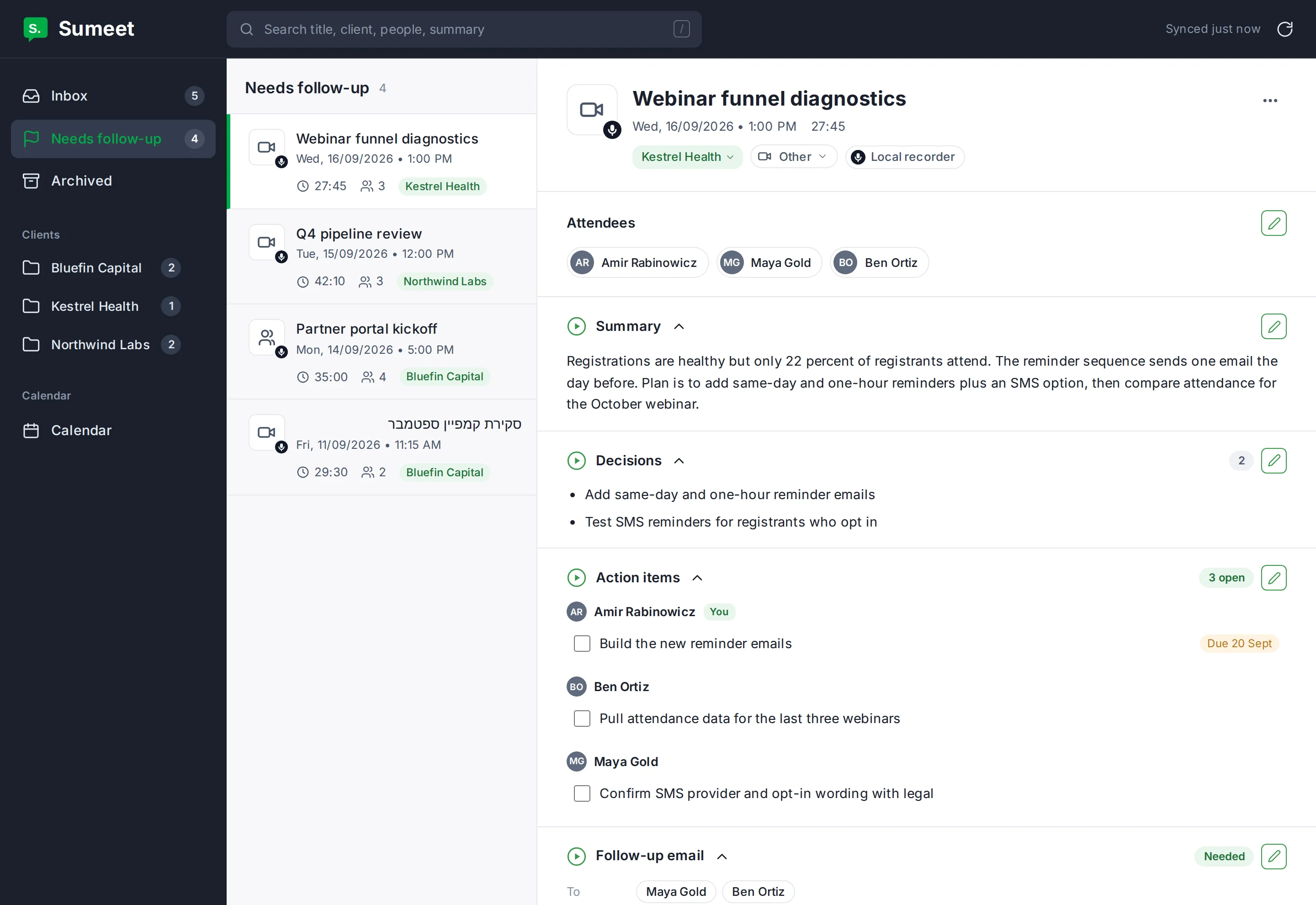
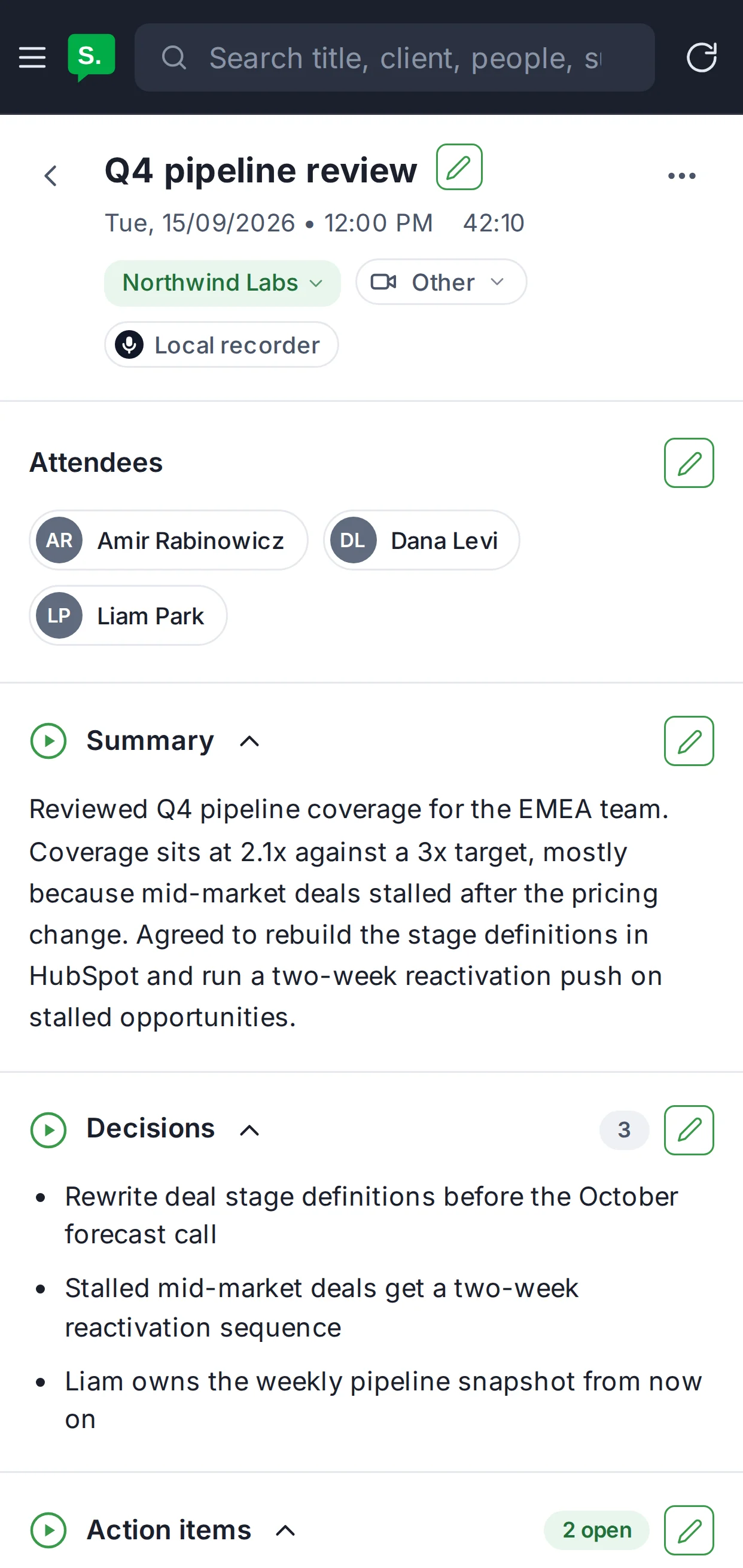
The inbox is a small web app on my own subdomain. It shows every meeting across all clients, a "needs follow-up" view, action items as checkboxes grouped by owner, and the follow-up email with a Copy button and an Open in Gmail button. The transcript is tucked away underneath. There is also a strip at the top with today's meetings, and a live badge while a call is being recorded.
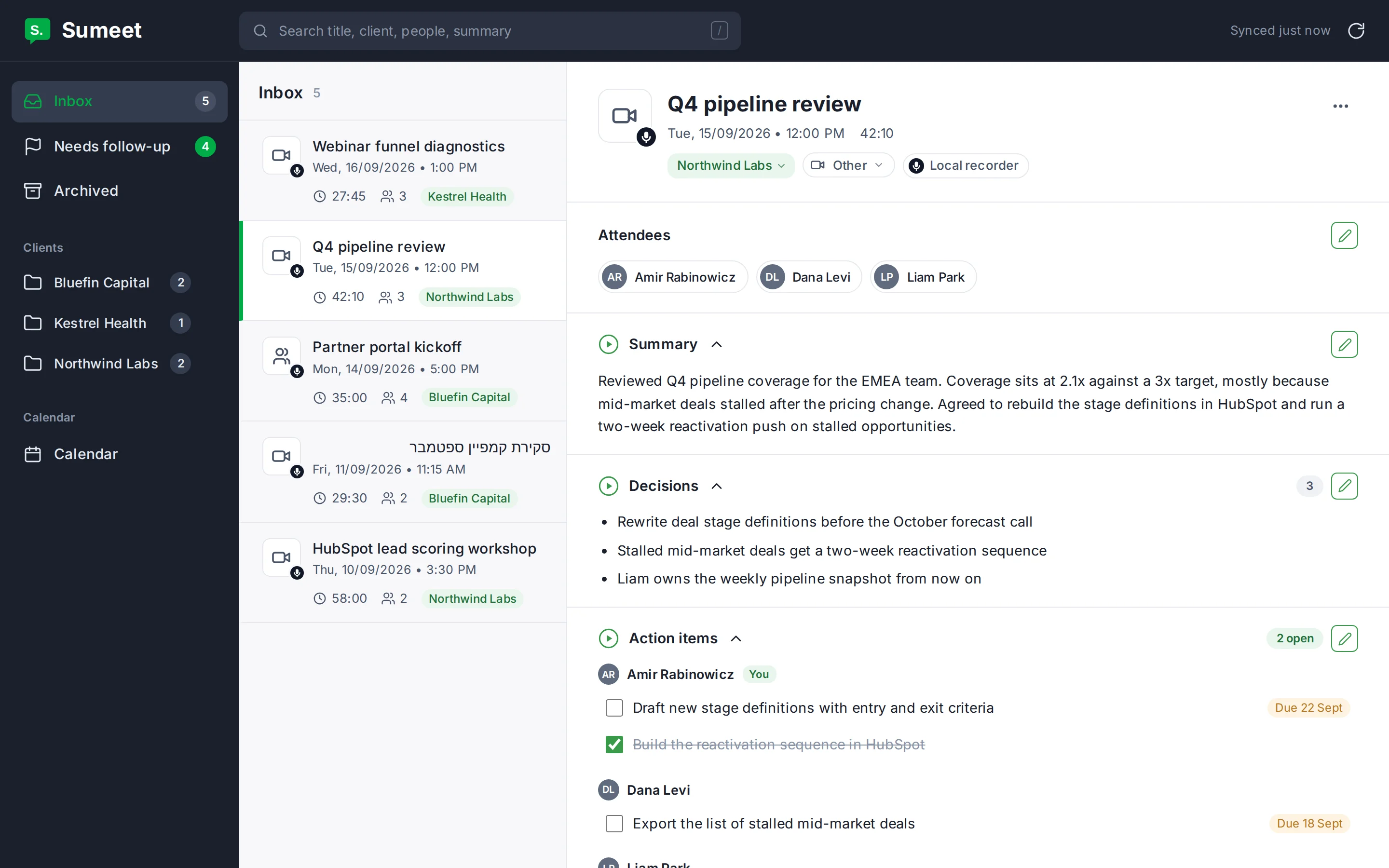
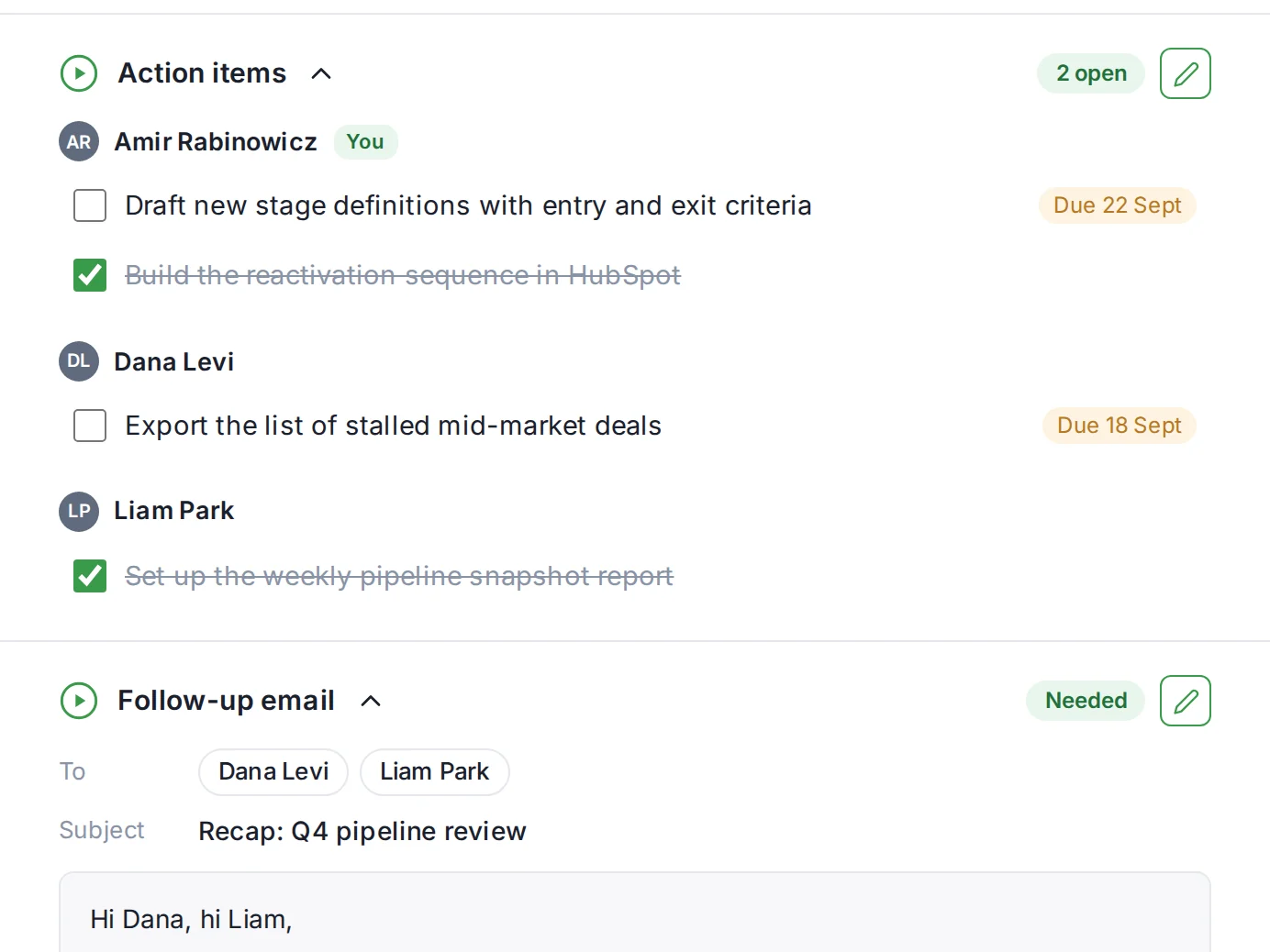
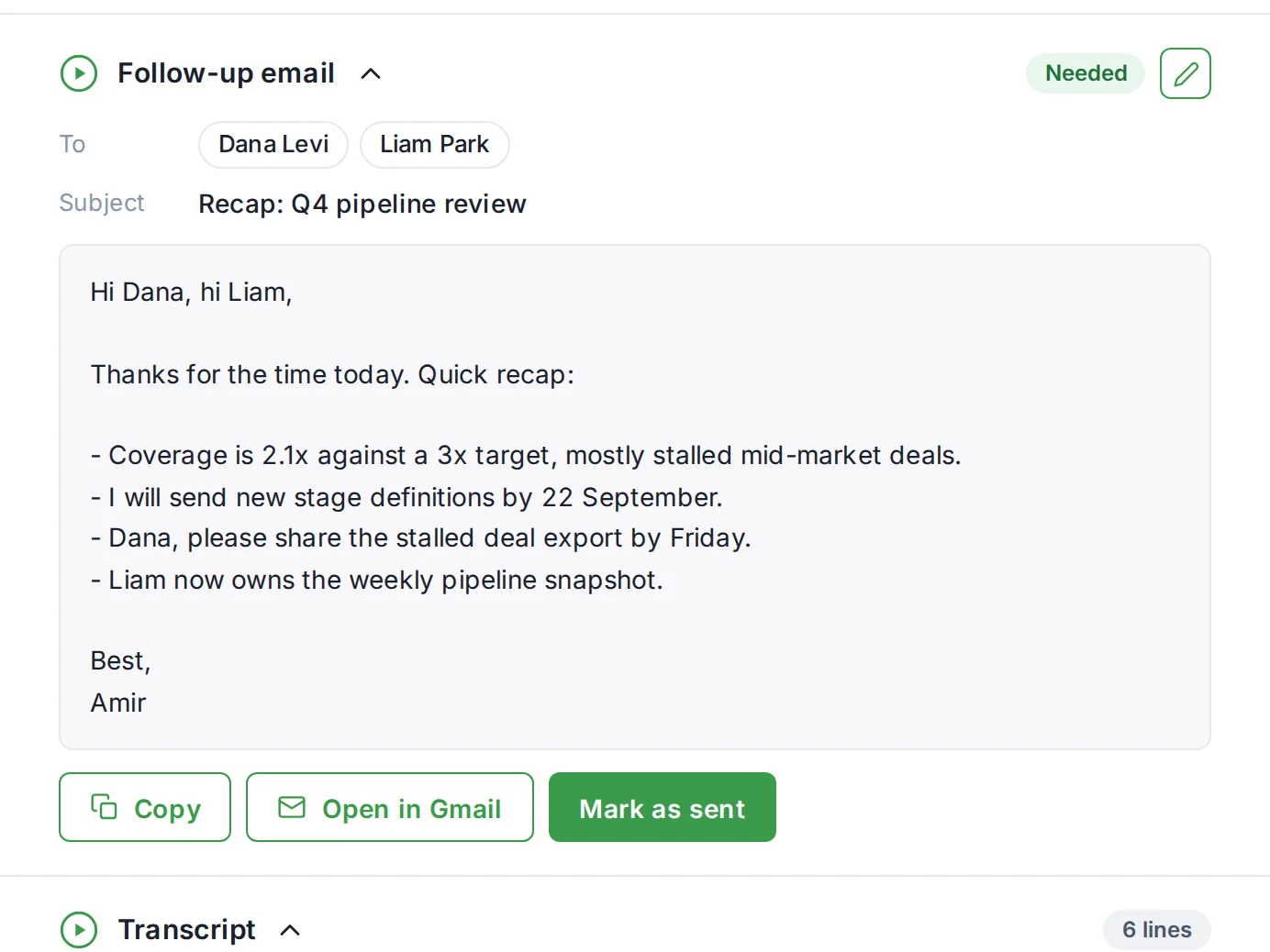
It runs as a Cloudflare Worker. Cloudflare Access sits in front of it, so only my email address can log in. The Worker reads meetings from Drive through the service account, and a small Cloudflare key-value store holds what I tick, edit and archive. The Worker also checks the Access login itself on every request, rather than trusting that the request came through Access, and the app has no public preview address that skips the login.
It works on the phone too, which is where I read most of it.
Want it on your own cloud without doing any of this yourself? That's the part I do.
Book a callWhat it's like to use
I join a call and a small recording pill appears in the corner of my screen, with a Stop button for the ones I do not want kept, and that is the only sign anything is happening. I hang up, and some minutes later a notification tells me the meeting is ready in the inbox.
In the morning I open the inbox with coffee, tick off what got done yesterday, and send two follow-ups I did not have to write. I usually change a word or two first. It sounds like me because I told it how I write.
The best part is the calls where I would not have taken notes at all. The ten-minute catch-up that turns out to contain a decision. The Hebrew call where someone promises a number by Thursday. Those used to evaporate. Now they are in the inbox with an owner and a date.
Got stuck, or want one of your own?
If you get partway through this and something will not work, book 30 minutes and we will see if I can help you finish it. And if you would rather not build it at all, I can build it for you, on your own cloud.
Book 30 minutes